案例简介
案例为一个商城管理系统,其作用者为使用商城管理的客户,以浏览器显示给客户进行对数据库的增删改查。
实现前戏
目录结构
用于展示给客户进行相应操作
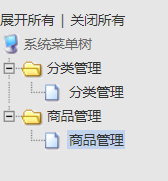
资源
通过从17素材网或者其他网站下载js代码
插入jsp文件
<%@ page language="java" pageEncoding="UTF-8" %>
<html>
<head>
    <meta http-equiv="Content-Type" content="text/html; charset=UTF-8"/>
    <title>菜单</title>
    <link href="${pageContext.request.contextPath}/css/left.css" rel="stylesheet" type="text/css"/>
    <link rel="StyleSheet" href="${pageContext.request.contextPath}/css/dtree.css" type="text/css"/>
</head>
<body>
<table width="100" border="0" cellspacing="0" cellpadding="0">
    <tr>
        <td height="12"></td>
    </tr>
</table>
<table width="100%" border="0">
    <tr>
        <td>
            <div class="dtree">

                <a href="javascript: d.openAll();">展开所有</a> | <a href="javascript: d.closeAll();">关闭所有</a>

                <script type="text/javascript" src="${pageContext.request.contextPath}/js/dtree.js"></script>
                <script type="text/javascript">

                    d = new dTree('d');
                    d.add('01', -1, '系统菜单树');
                    d.add('0102', '01', '分类管理', '', '', 'mainFrame');
                    d.add('010201', '0102', '分类管理', '${pageContext.request.contextPath}/CategoryList', '', 'mainFrame');
                    d.add('0104', '01', '商品管理');
                    d.add('010401', '0104', '商品管理', '${pageContext.request.contextPath}/AdminProductList', '', 'mainFrame');
                    document.write(d);

                </script>
            </div>
        </td>
    </tr>
</table>
</body>
</html>
案例结构
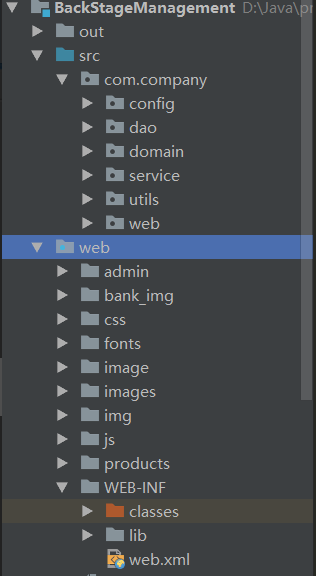
通过Idea建立如下图所示目录结构:
查询所有的产品
确定查询所有产品的点击选项

编写servlet
package com.company.web;

import com.company.domain.Product;
import com.company.service.AdminService;
import javax.servlet.ServletException;
import javax.servlet.annotation.WebServlet;
import javax.servlet.http.HttpServlet;
import javax.servlet.http.HttpServletRequest;
import javax.servlet.http.HttpServletResponse;
import java.io.IOException;
import java.sql.SQLException;
import java.util.List;

@WebServlet(name = "AdminProductList", urlPatterns = "/AdminProductList")
public class AdminProductListServlet extends HttpServlet {
    protected void doPost(HttpServletRequest request, HttpServletResponse response) throws ServletException, IOException {
        doGet(request, response);
    }

    protected void doGet(HttpServletRequest request, HttpServletResponse response) throws ServletException, IOException {

        //        1.调用service层获取数据库商品信息的方法
        AdminService adminService = new AdminService();
        List<Product> products = null;
        try {
            products = adminService.getProductList();
        } catch (SQLException e) {
            e.printStackTrace();
        }

        //        2.将获取的商品信息放置于request域,并且转发给jsp显示
        request.setAttribute("products", products);
        request.getRequestDispatcher(request.getContextPath() + "/admin/product/list.jsp").forward(request, response);
    }
}
service层
package com.company.service;

import com.company.dao.AdminDao;
import com.company.domain.Product;
import java.sql.SQLException;
import java.util.List;

public class AdminService {
    public List<Product> getProductList() throws SQLException {

        //        调用dao层方法对数据库进行操作并且封装到JavaBean对象集合作为返回
        AdminDao adminDao = new AdminDao();
        return adminDao.getProductList();
    }
}
dao层
package com.company.dao;

import com.company.domain.Product;
import com.company.utils.DbUTils;
import org.apache.commons.dbutils.QueryRunner;
import org.apache.commons.dbutils.handlers.BeanListHandler;

import java.sql.SQLException;
import java.util.List;

public class AdminDao {
    public List<Product> getProductList() throws SQLException {

        //        1.获取sql语句执行对象
        QueryRunner queryRunner = new QueryRunner(DbUTils.get_connection_pool());

        //        2.编写sql语句
        String sql = "SELECT * FROM product;";

        //        3.返回获取的JavaBean对象的集合
        return queryRunner.query(sql, new BeanListHandler<>(Product.class));
    }
}
删除
传入需要删除条目主键值
确认删除
为了防止用户无意点错,需要进行确认删除操作
<td align="center" style="HEIGHT: 22px">

	<img src="${pageContext.request.contextPath}/images/i_del.gif"
		 width="16" height="16" border="0" style="cursor: pointer"
		 onclick="delProduct('${product.pid}')"
	>

</td>
确认删除跳转到需要删除的servlet,并且在请求传递pid参数
function delProduct(pid) {
	var boolean = confirm("请确认是否删除?");
	if (boolean) {
		// 跳转到删除的servlet
		window.location.href = "${pageContext.request.contextPath}/DelProduct?pid=" + pid;
	}
}
web层Servlet
获取request传入的pid,传递给业务层service,业务层调用dao层操作数据库,完成删除pid条目,给用户回显删除之后的信息,跳转到查询页面
package com.company.web;

import com.company.service.AdminService;
import javax.servlet.ServletException;
import javax.servlet.annotation.WebServlet;
import javax.servlet.http.HttpServlet;
import javax.servlet.http.HttpServletRequest;
import javax.servlet.http.HttpServletResponse;
import java.io.IOException;
import java.sql.SQLException;

@WebServlet(name = "DelProduct", urlPatterns = "/DelProduct")
public class DelProductServlet extends HttpServlet {
    protected void doPost(HttpServletRequest request, HttpServletResponse response) throws ServletException, IOException {
        doGet(request, response);
    }

    protected void doGet(HttpServletRequest request, HttpServletResponse response) throws ServletException, IOException {

        //        1.获取pid
        int pid = Integer.valueOf(request.getParameter("pid"));

        //        2.传递给service,调用删除product方法
        AdminService adminService = new AdminService();
        try {
            adminService.delProduct(pid);
        } catch (SQLException e) {
            e.printStackTrace();
        }

        //        3.回显给用户,重定向
        response.sendRedirect(request.getContextPath()+"/AdminProductList");
    }
}
dao层
package com.company.dao;

import com.company.domain.Product;
import com.company.utils.DbUTils;
import org.apache.commons.dbutils.QueryRunner;
import org.apache.commons.dbutils.handlers.BeanListHandler;
import java.sql.SQLException;
import java.util.List;

public class AdminDao {
    public List<Product> getProductList() throws SQLException {

        //        1.获取sql语句执行对象
        QueryRunner queryRunner = new QueryRunner(DbUTils.get_connection_pool());

        //        2.编写sql语句
        String sql = "SELECT * FROM product;";

        //        3.返回获取的JavaBean对象的集合
        return queryRunner.query(sql, new BeanListHandler<>(Product.class));
    }

    public void delProduct(int pid) throws SQLException {

        //        1.获取sql语句执行对象
        QueryRunner queryRunner = new QueryRunner(DbUTils.get_connection_pool());

        //        2.编写sql语句
        String sql = "DELETE FROM product WHERE pid=?;";

        queryRunner.update(sql, pid);
    }
}
添加条目
条目分类
在添加条目的时候需要选择作为分类,这样就要从后台传递类别category表条目cname栏作为显示,先从后台获取所有分类数据
package com.company.web;

import com.company.domain.ProductCategory;
import com.company.service.AdminService;
import javax.servlet.ServletException;
import javax.servlet.annotation.WebServlet;
import javax.servlet.http.HttpServlet;
import javax.servlet.http.HttpServletRequest;
import javax.servlet.http.HttpServletResponse;
import java.io.IOException;
import java.sql.SQLException;
import java.util.List;

@WebServlet(name = "AddProduct", urlPatterns = "/AddProduct")
public class AddProductServlet extends HttpServlet {
    protected void doPost(HttpServletRequest request, HttpServletResponse response) throws ServletException, IOException {
        doGet(request, response);
    }

    protected void doGet(HttpServletRequest request, HttpServletResponse response) throws ServletException, IOException {

        //        1.调用service查询分类方法获取分类条目
        AdminService adminService = new AdminService();
        List<ProductCategory> productCategories = null;
        try {
            productCategories = adminService.getCategoryList();
        } catch (SQLException e) {
            e.printStackTrace();
        }

        //        2.将分类条目作为reqeust域参数传递
        request.setAttribute("productCategories", productCategories);

        //        3.转发请求
        request.getRequestDispatcher(request.getContextPath() + "/admin/product/add.jsp").forward(request, response);
    }
}
jsp生成分类下拉栏
在jsp页面通过el&jstl代码for each生成下拉选择栏
<select name="cid">
	<c:forEach items="${productCategories}" var="productCategory">
		<option value="${productCategory.cid}">${productCategory.cname}</option>
	</c:forEach>
</select>
jsp表单提交
jsp表单提交数据给servlet进行后台数据处理,操作数据库
package com.company.web;

import com.company.domain.Product;
import com.company.service.AdminService;
import org.apache.commons.beanutils.BeanUtils;
import javax.servlet.ServletException;
import javax.servlet.annotation.WebServlet;
import javax.servlet.http.HttpServlet;
import javax.servlet.http.HttpServletRequest;
import javax.servlet.http.HttpServletResponse;
import java.io.IOException;
import java.lang.reflect.InvocationTargetException;
import java.sql.SQLException;
import java.text.SimpleDateFormat;
import java.util.Date;
import java.util.Map;
import java.util.UUID;

@WebServlet(name = "AddProductSubmit", urlPatterns = "/AddProductSubmit")
public class AddProductSubmitServlet extends HttpServlet {
    protected void doPost(HttpServletRequest request, HttpServletResponse response) throws ServletException, IOException {
        doGet(request, response);
    }

    protected void doGet(HttpServletRequest request, HttpServletResponse response) throws ServletException, IOException {


        //        0.设置请求参数编码方式
        request.setCharacterEncoding("utf-8");
        //        1.获取请求参数
        Map<String, String[]> map = request.getParameterMap();

        //        2.封装数据
        Product product = new Product();
        try {
            BeanUtils.populate(product, map);
        } catch (IllegalAccessException | InvocationTargetException e) {
            e.printStackTrace();
        }

        //        3.添加表单没有的数据

        /*
        1.pdate
        2.pimage
        3.pid
        4.pflag

         */

        //        1.pdate
        SimpleDateFormat dateFormat = new SimpleDateFormat("yyyy-MM-dd");
        Date date = new Date();
        product.setPdate(dateFormat.format(date));

        //        2.pimage
        product.setPimage("products/c_0001.jpg");

        //        3.pid
        product.setPid(UUID.randomUUID().toString());

        //        4.pflag
        product.setPflag(0);

        System.out.println(product);

        //        4.将product传入service层
        AdminService adminService = new AdminService();
        try {
            adminService.setProduct(product);
        } catch (SQLException e) {
            e.printStackTrace();
        }

        //        5.进行重定向
        response.sendRedirect(request.getContextPath() + "/AdminProductList");
    }
}
进行数据回显
重定向查询servlet
//        5.进行重定向
response.sendRedirect(request.getContextPath() + "/AdminProductList");
编辑条目
思路
- 获取需要编辑的条目信息
- 请求编辑的servlet,并且将条目信息传入servlet
- servlet根据条目信息从数据库获取product的JavaBean对象
- 将product放进request域中,并且转发给edit.jsp
- jsp文件中取出product,显示
- 用户修改之后点击确认按钮,传给另外一个submitservlet,获取请求参数
- 将请求参数进行修改
- 重定向展示页面
获取需要编辑的条目信息
通过jsp链接传递pid参数
<td align="center" style="HEIGHT: 22px">
	<a href="${pageContext.request.contextPath}/EditProduct?pid=${product.pid}">
		<img src="${pageContext.request.contextPath}/images/i_edit.gif"
			 border="0" style="CURSOR: hand">
	</a>
</td>
servlet
根据pid获取条目信息,将其设置于reqeust,同时获取分类信息并设置于reqeust,最后转发给jsp
package com.company.web;

import com.company.domain.Product;
import com.company.domain.ProductCategory;
import com.company.service.AdminService;
import javax.servlet.ServletException;
import javax.servlet.annotation.WebServlet;
import javax.servlet.http.HttpServlet;
import javax.servlet.http.HttpServletRequest;
import javax.servlet.http.HttpServletResponse;
import java.io.IOException;
import java.sql.SQLException;
import java.util.List;

@WebServlet(name = "EditProduct", urlPatterns = "/EditProduct")
public class EditProductServlet extends HttpServlet {

    protected void doPost(HttpServletRequest request, HttpServletResponse response) throws ServletException, IOException {
        doGet(request, response);
    }

    protected void doGet(HttpServletRequest request, HttpServletResponse response) throws ServletException, IOException {

        //        1.获取请求参数
        String pid = request.getParameter("pid");

        //        2.根据请求参数获取JavaBean对象
        AdminService adminService = new AdminService();
        Product product = null;
        try {
            product = adminService.getProduct(pid);
        } catch (SQLException e) {
            e.printStackTrace();
        }

        //        3.将JavaBean对象传入reqeust中
        request.setAttribute("product", product);

        //        4.从后台获取所有分类数据
        List<ProductCategory> categories = null;
        try {
            categories = adminService.getCategoryList();
        } catch (SQLException e) {
            e.printStackTrace();
        }

        //        5.将分类数据传入reqeust
        request.setAttribute("categories", categories);
        //        6.转发请求给edit.jsp
        request.getRequestDispatcher(request.getContextPath() + "/admin/product/edit.jsp").forward(request, response);
    }
}
jsp文件
取出product以及分类信息并且显示
<%@ taglib prefix="c" uri="http://java.sun.com/jsp/jstl/core" %>
<%@ page language="java" pageEncoding="UTF-8" %>
<HTML>
<HEAD>
<meta http-equiv="Content-Language" content="zh-cn">
<meta http-equiv="Content-Type" content="text/html; charset=UTF-8">
<LINK href="${pageContext.request.contextPath}/css/Style1.css" type="text/css" rel="stylesheet">
</HEAD>
<body>
<!-- -->
<form id="userAction_save_do" name="Form1" action="${pageContext.request.contextPath}/adminProduct_update.action"
method="post" enctype="multipart/form-data">
<table cellSpacing="1" cellPadding="5" width="100%" align="center" bgColor="#eeeeee"
style="border: 1px solid #8ba7e3" border="0">
<tr>
<td class="ta_01" align="center" bgColor="#afd1f3" colSpan="4"
height="26">
<strong><STRONG>编辑商品</STRONG>
</strong>
</td>
</tr>
<tr>
<td width="18%" align="center" bgColor="#f5fafe" class="ta_01">
商品名称:
</td>
<td class="ta_01" bgColor="#ffffff">
<input type="text" name="pname" value="${product.pname}" id="userAction_save_do_logonName" class="bg"/>
</td>
<td width="18%" align="center" bgColor="#f5fafe" class="ta_01">
是否热门:
</td>
<td class="ta_01" bgColor="#ffffff">
<select name="is_hot">
<c:if test="${product.is_hot==0}">
<option value="0" selected>否</option>
<option value="1">是</option>
</c:if>
<c:if test="${product.is_hot==1}">
<option value="0">否</option>
<option value="1" selected>是</option>
</c:if>
</select>
</td>
</tr>
<tr>
<td width="18%" align="center" bgColor="#f5fafe" class="ta_01">
市场价格:
</td>
<td class="ta_01" bgColor="#ffffff">
<input type="text" name="market_price" value="${product.market_price}" id="userAction_save_do_logonName"
class="bg"/>
</td>
<td width="18%" align="center" bgColor="#f5fafe" class="ta_01">
商城价格:
</td>
<td class="ta_01" bgColor="#ffffff">
<input type="text" name="shop_price" value="${product.shop_price}" id="userAction_save_do_logonName"
class="bg"/>
</td>
</tr>
<tr>
<td width="18%" align="center" bgColor="#f5fafe" class="ta_01">
商品图片:
</td>
<td class="ta_01" bgColor="#ffffff" colspan="3">
<input type="file" name="upload"/>
</td>
</tr>
<tr>
<td width="18%" align="center" bgColor="#f5fafe" class="ta_01">
所属分类:
</td>
<td class="ta_01" bgColor="#ffffff" colspan="3">
<select name="categorySecond.csid">
<c:forEach items="${categories}" var="category">
<option value="${category.cid}">${category.cname}</option>
</c:forEach>
</select>
</td>
</tr>
<tr>
<td width="18%" align="center" bgColor="#f5fafe" class="ta_01">
商品描述:
</td>
<td class="ta_01" bgColor="#ffffff" colspan="3">
<textarea name="pdesc" rows="5" cols="30">
${product.pdesc}
</textarea>
</td>
</tr>
<tr>
<td class="ta_01" style="WIDTH: 100%" align="center"
bgColor="#f5fafe" colSpan="4">
<button type="submit" id="userAction_save_do_submit" value="确定" class="button_ok">
确定
</button>
<FONT face="宋体"> </FONT>
<button type="reset" value="重置" class="button_cancel">重置</button>
<FONT face="宋体"> </FONT>
<INPUT class="button_ok" type="button" onclick="history.go(-1)" value="返回"/>
<span id="Label1"></span>
</td>
</tr>
</table>
</form>
</body>
</HTML>
提交修改信息
<%@ taglib prefix="c" uri="http://java.sun.com/jsp/jstl/core" %>
<%@ page language="java" pageEncoding="UTF-8" %>
<HTML>
<HEAD>
<meta http-equiv="Content-Language" content="zh-cn">
<meta http-equiv="Content-Type" content="text/html; charset=UTF-8">
<LINK href="${pageContext.request.contextPath}/css/Style1.css" type="text/css" rel="stylesheet">
</HEAD>
<body>
<!-- -->
<form id="userAction_save_do" name="Form1" action="${pageContext.request.contextPath}/EditProductSubmit?pid=${product.pid}" //将当前需要修改的product的pid参数通过url传递给servlet
method="post" >
<table cellSpacing="1" cellPadding="5" width="100%" align="center" bgColor="#eeeeee"
style="border: 1px solid #8ba7e3" border="0">
<tr>
<td class="ta_01" align="center" bgColor="#afd1f3" colSpan="4"
height="26">
<strong><STRONG>编辑商品</STRONG>
</strong>
</td>
</tr>
<tr>
<td width="18%" align="center" bgColor="#f5fafe" class="ta_01">
商品名称:
</td>
<td class="ta_01" bgColor="#ffffff">
<input type="text" name="pname" value="${product.pname}" id="userAction_save_do_logonName" class="bg"/>
</td>
<td width="18%" align="center" bgColor="#f5fafe" class="ta_01">
是否热门:
</td>
<td class="ta_01" bgColor="#ffffff">
<select name="is_hot">
<c:if test="${product.is_hot==0}">
<option value="0" selected>否</option>
<option value="1">是</option>
</c:if>
<c:if test="${product.is_hot==1}">
<option value="0">否</option>
<option value="1" selected>是</option>
</c:if>
</select>
</td>
</tr>
<tr>
<td width="18%" align="center" bgColor="#f5fafe" class="ta_01">
市场价格:
</td>
<td class="ta_01" bgColor="#ffffff">
<input type="text" name="market_price" value="${product.market_price}" id="userAction_save_do_logonName"
class="bg"/>
</td>
<td width="18%" align="center" bgColor="#f5fafe" class="ta_01">
商城价格:
</td>
<td class="ta_01" bgColor="#ffffff">
<input type="text" name="shop_price" value="${product.shop_price}" id="userAction_save_do_logonName"
class="bg"/>
</td>
</tr>
<tr>
<td width="18%" align="center" bgColor="#f5fafe" class="ta_01">
商品图片:
</td>
<td class="ta_01" bgColor="#ffffff" colspan="3">
<input type="file" name="upload"/>
</td>
</tr>
<tr>
<td width="18%" align="center" bgColor="#f5fafe" class="ta_01">
所属分类:
</td>
<td class="ta_01" bgColor="#ffffff" colspan="3">
<select name="cid">
<c:forEach items="${categories}" var="category">
<option value="${category.cid}">${category.cname}</option>
</c:forEach>
</select>
</td>
</tr>
<tr>
<td width="18%" align="center" bgColor="#f5fafe" class="ta_01">
商品描述:
</td>
<td class="ta_01" bgColor="#ffffff" colspan="3">
<textarea name="pdesc" rows="5" cols="30">
${product.pdesc}
</textarea>
</td>
</tr>
<tr>
<td class="ta_01" style="WIDTH: 100%" align="center"
bgColor="#f5fafe" colSpan="4">
<button type="submit" id="userAction_save_do_submit" value="确定" class="button_ok">
确定
</button>
<FONT face="宋体"> </FONT>
<button type="reset" value="重置" class="button_cancel">重置</button>
<FONT face="宋体"> </FONT>
<INPUT class="button_ok" type="button" onclick="history.go(-1)" value="返回"/>
<span id="Label1"></span>
</td>
</tr>
</table>
</form>
</body>
</HTML>
提交的servlet
EditProductServlet
package com.company.web;

import com.company.domain.Product;
import com.company.service.AdminService;
import org.apache.commons.beanutils.BeanUtils;

import javax.servlet.ServletException;
import javax.servlet.annotation.WebServlet;
import javax.servlet.http.HttpServlet;
import javax.servlet.http.HttpServletRequest;
import javax.servlet.http.HttpServletResponse;
import java.io.IOException;
import java.lang.reflect.InvocationTargetException;
import java.sql.SQLException;
import java.text.SimpleDateFormat;
import java.util.Date;
import java.util.Map;

@WebServlet(name = "EditProductSubmit", urlPatterns = "/EditProductSubmit")
public class EditProductSubmitServlet extends HttpServlet {
    protected void doPost(HttpServletRequest request, HttpServletResponse response) throws ServletException, IOException {
        doGet(request, response);
    }

    protected void doGet(HttpServletRequest request, HttpServletResponse response) throws ServletException, IOException {

        //        0.设置request编码方式
        request.setCharacterEncoding("utf-8");

        //        1.获取表单数据
        Map<String, String[]> map = request.getParameterMap();

        //        2.将表单数据封装到JavaBean中
        Product product = new Product();
        try {
            BeanUtils.populate(product, map);
        } catch (IllegalAccessException | InvocationTargetException e) {
            e.printStackTrace();
        }

        //        3.表单未提交但需要更改的项pdate
        SimpleDateFormat dateFormat = new SimpleDateFormat("yyyy-MM-dd");
        String format = dateFormat.format(new Date());
        product.setPdate(format);

        //        将request参数pid传入Product
        product.setPid(request.getParameter("pid"));

        //        4.将product传给service层
        AdminService adminService = new AdminService();
        try {
            adminService.setEditProduct(product);
        } catch (SQLException e) {
            e.printStackTrace();
        }

        //        5.进行给用户回显(重定向)
        response.sendRedirect(request.getContextPath() + "/AdminProductList");
    }
}
回显给用户
通过重定向将信息回显给用户
response.sendRedirect(request.getContextPath() + "/AdminProductList");