完成自动登录案例
用户以及验证码校验
步骤
- 从后台完成验证码的代码生成,同时将验证码对应文本写入session域中
- 完成前台登录页面,用户访问登录页面,session域设定好用户对应的验证码文本
- 用户写入验证码,当鼠标焦点离开input框,发送Ajax请求,携带用户输入内容
- 对用户输入验证码进行校验,验证码正确与否作出相应响应
- 当点击登录按钮时,触发校验用户名以及密码事件,通过Ajax将用户名以及密码传递给登录servlet,进行数据库查询
- 返回查询结果,结果存在与否作出相应相应
导入相应jar包
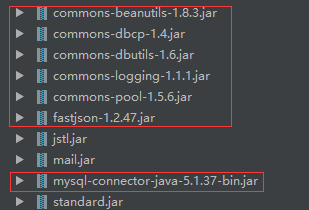
自动生成验证码图片工具
package com.company.utils;

import java.awt.Color;
import java.awt.Font;
import java.awt.Graphics2D;
import java.awt.image.BufferedImage;
import java.io.FileNotFoundException;
import java.io.FileOutputStream;
import java.io.IOException;
import java.io.OutputStream;
import java.util.Random;

import javax.imageio.ImageIO;


public class VerifiCode {

    private int weight = 100;             //验证码图片的长和宽
    private int height = 50;
    private String text;                //用来保存验证码的文本内容
    private Random r = new Random();      //获取随机数对象
    private String[] fontNames = {"宋体", "华文楷体", "黑体", "微软雅黑", "楷体_GB2312"};   //字体数组

    private Color randomColor()          //获取随机的颜色
    {
        int r = this.r.nextInt(150);        //这里为什么是150,因为当r,g,b都为255时,即为白色,为了好辨认,需要颜色深一点。
        int g = this.r.nextInt(150);
        int b = this.r.nextInt(150);
        return new Color(r, g, b);          //返回一个随机颜色
    }

    private Font randomFont()              //获取随机字体
    {
        int index = r.nextInt(fontNames.length);      //获取随机的字体
        String fontName = fontNames[index];
        int style = r.nextInt(4);            //随机获取字体的样式,0是无样式,1是加粗,2是斜体,3是加粗加斜体
        int size = r.nextInt(5) + 24;              //随机获取字体的大小
        return new Font(fontName, style, size);   //返回一个随机的字体
    }

    private char randomChar()           //获取随机字符
    {
        String codes = "23456789abcdefghjkmnopqrstuvwxyzABCDEFGHJKMNPQRSTUVWXYZ";
        int index = r.nextInt(codes.length());
        return codes.charAt(index);
    }

    private void drawLine(BufferedImage image)             //画干扰线,验证码干扰线用来防止计算机解析图片
    {
        int num = 3;                                         //定义干扰线的数量
        Graphics2D g = (Graphics2D) image.getGraphics();
        for (int i = 0; i < num; i++) {
            int x1 = r.nextInt(weight);
            int y1 = r.nextInt(height);
            int x2 = r.nextInt(weight);
            int y2 = r.nextInt(height);
            g.setColor(randomColor());
            g.drawLine(x1, y1, x2, y2);
        }
    }

    private BufferedImage createImage()           //创建图片的方法
    {
        BufferedImage image = new BufferedImage(weight, height, BufferedImage.TYPE_INT_RGB); //创建图片缓冲区
        Graphics2D g = (Graphics2D) image.getGraphics();     //获取画笔
        g.setColor(Color.GRAY);                 //设置背景色
        g.fillRect(0, 0, weight, height);
        return image;                           //返回一个图片
    }

    public BufferedImage getImage()             //获取验证码图片的方法
    {
        BufferedImage image = createImage();
        Graphics2D g = (Graphics2D) image.getGraphics();     //获取画笔
        StringBuilder sb = new StringBuilder();
        for (int i = 0; i < 4; i++)                    //画四个字符即可
        {
            String s = randomChar() + "";                           //随机生成字符,因为只有画字符串的方法,没有画字符的方法,所以需要将字符变成字符串再画
            sb.append(s);                                  //添加到StringBuilder里面
            float x = i * 1.0F * weight / 4;                     //定义字符的x坐标
            g.setFont(randomFont());                      //设置字体,随机
            g.setColor(randomColor());                    //设置颜色,随机
            g.drawString(s, x, height - 5);
        }
        this.text = sb.toString();
        drawLine(image);
        return image;
    }

    public String getText()                             //获取验证码文本的方法
    {
        return text;
    }

    public static void output(BufferedImage image, OutputStream out) throws IOException                  //将验证码图片写出的方法
    {
        ImageIO.write(image, "JPEG", out);
    }
}
验证码传输servlet
package com.company.web.servlet;

import com.company.utils.VerifiCode;

import javax.servlet.ServletException;
import javax.servlet.annotation.WebServlet;
import javax.servlet.http.HttpServlet;
import javax.servlet.http.HttpServletRequest;
import javax.servlet.http.HttpServletResponse;
import javax.servlet.http.HttpSession;
import java.awt.image.BufferedImage;
import java.io.IOException;

@WebServlet(name = "captcha", urlPatterns = "/captcha")
public class CaptchaServlet extends HttpServlet {
    protected void doPost(HttpServletRequest request, HttpServletResponse response) throws ServletException, IOException {
        doGet(request, response);
    }

    protected void doGet(HttpServletRequest request, HttpServletResponse response) throws ServletException, IOException {


        //        0.获取session对象
        HttpSession session = request.getSession();

        //        1.获取验证码图片以及验证码文本
        VerifiCode verifiCode = new VerifiCode();
        BufferedImage image = verifiCode.getImage();
        String text = verifiCode.getText();
        session.setAttribute("captcha",text.toLowerCase());

        //        2.将验证码图片输出
        VerifiCode.output(image, response.getOutputStream());
    }
}
编写登录html
<!DOCTYPE html>
<html lang="en">
<head>
<meta charset="UTF-8">
<title>登录</title>
<link rel="stylesheet" href="../css/index.css">
</head>
<body>
<div id="wrap">
<div id="top-bg">
</div>
<div id="header">
<h1 id="logo-text"><a href="index.html" title="">泰格<span>♥个人博客</span></a></h1>
<p id="slogan">一个技术分享,共同学习、交流的个人技术博客</p>
<div id="header-links">
<p>
<a href="index.html">Home</a> |
<a href="register.html">注册</a> |
<a href="login.html">登录</a>
</p>
</div>
</div>
<div id="header-photo"></div>
<!--登录页面-->
<div id="login">
<div id="out_form_1">
<div id="form_title">
<div id="form_head_1">
请输入用户名和密码
</div>
</div>
<form action="/login" id="register_1" method="post">
<div class="form_group">
<div class="name_label">
用户名
</div>
<label>
<input class="input_block" type="text" name="username"
placeholder="请输入正确的用户名">
<span id="username">
</span>
</label>
</div>
<div class="form_group">
<div class="name_label">密码</div>
<label><input type="password" class="input_block" name="password"
placeholder="请输入密码"></label>
</div>
<div id="captcha">
<div class="text">验证码</div>
<div class="input1">
<input type="text" id="captcha-input" name="captcha" placeholder="输入验证码">
<div id="hidden" style="padding: 0;width: 97px">
</div>
</div>
<div class="image">
<img src="/captcha" alt="">
<div style="cursor: pointer">
看不清?点击刷新
</div>
</div>
</div>
<div class="form_group" style="color: black;padding-left: 138px;font-size: 12px;">
下次自动登录 <input type="checkbox" style="width: 15px;height: 15px;" name="autoLogin" value="true">
</div>
<div style="clear: both "></div>
<div class="form_group">
<div class="name_label"></div>
<input type="submit" class="btn" value="登录" id="submit" style="cursor:pointer">
</div>
</form>
</div>
</div>
<!-- footer starts -->
<div id="footer-wrap">
<div id="footer-columns">
<div class="col3">
<h3>Tincidunt</h3>
<ul>
<li><a href="index.html">consequat molestie</a></li>
<li><a href="index.html">sem justo</a></li>
<li><a href="index.html">semper</a></li>
<li><a href="index.html">magna sed purus</a></li>
<li><a href="index.html">tincidunt</a></li>
</ul>
</div>
<div class="col3-center">
<h3>Sed purus</h3>
<ul>
<li><a href="index.html">consequat molestie</a></li>
<li><a href="index.html">sem justo</a></li>
<li><a href="index.html">semper</a></li>
<li><a href="index.html">magna sed purus</a></li>
<li><a href="index.html">tincidunt</a></li>
</ul>
</div>
<div class="col3">
<h3>Praesent</h3>
<ul>
<li><a href="index.html">consequat molestie</a></li>
<li><a href="index.html">sem justo</a></li>
<li><a href="index.html">semper</a></li>
<li><a href="index.html">magna sed purus</a></li>
<li><a href="index.html">tincidunt</a></li>
</ul>
</div>
<!-- footer-columns ends -->
</div>
<div id="footer-bottom">
<p>
© 2010 Your Company
<a href="http://www.cssmoban.com/" title="Website Templates">website templates</a> from <a
href="http://www.cssmoban.com/">????</a>
<a href="index.html">Home</a> |
<a href="index.html">Sitemap</a> |
<a href="index.html">RSS Feed</a> |
<a href="http://validator.w3.org/check?uri=referer">XHTML</a> |
<a href="http://jigsaw.w3.org/css-validator/check/referer">CSS</a>
</p>
</div>
<!-- footer ends-->
</div>
</div>
</body>
</html>
编写js代码完成登录校验
<script src="../js/jquery-2.1.0.js"></script>
<script>

    $(function () {
        // 登录按钮鼠标覆盖改变颜色
        let submit = $("#submit");

        submit.submit();

        submit.on("mouseover", function () {
            submit.css("background", "#1d15c9")
        });

        submit.on("mouseout", function () {
            submit.css("background", "#146dfc")
        });


        // 点击登录进行ajax校验
        submit.on("click", function () {
            flag = -1;
            $.ajax({
                type: "post",
                url: "/checkmes",
                async: false,
                data: {
                    // 表单将数据传输给服务器
                    "password": $("input[name=password]").val(),
                    "username": $("input[name=username]").val(),
                    "captcha": $("#captcha-input").val()
                },
                success: function (data) {
                    // 对data的result属性进行判断
                    if (data.result === true) {
                        // 验证通过标志位改为1
                        flag = 1;
                    } else {
                        // 验证不通过,显示错误信息
                        $("#hidden").html(data.result)
                    }
                },
                dataType: "json"
            });
            if (flag !== 1) {
                return false;
            }
        });
    });

    // 点击看不清刷新图片
    $(function () {
        // 1.定位图片
        $(".image div").click(function () {
            $(".image img").attr("src", "/captcha?time=" + new Date().getTime());
        })
    });
</script>
表单校验CheckMesServlet
package com.company.web.servlet;

import com.alibaba.fastjson.JSON;
import com.company.domain.User;
import com.company.service.AutoLoginService;
import org.apache.commons.beanutils.BeanUtils;
import javax.servlet.ServletException;
import javax.servlet.annotation.WebServlet;
import javax.servlet.http.HttpServlet;
import javax.servlet.http.HttpServletRequest;
import javax.servlet.http.HttpServletResponse;
import javax.servlet.http.HttpSession;
import java.io.IOException;
import java.lang.reflect.InvocationTargetException;
import java.sql.SQLException;

@WebServlet(name = "checkmes", urlPatterns = "/checkmes")
public class CheckMesServlet extends HttpServlet {
    protected void doPost(HttpServletRequest request, HttpServletResponse response) throws ServletException, IOException {
        doGet(request, response);
    }

    protected void doGet(HttpServletRequest request, HttpServletResponse response) throws ServletException, IOException {

        String Json;

        //        0.对数据进行转码
        response.setContentType("text/html;charset=utf-8");

        //        1.获取session对象
        HttpSession session = request.getSession();

        //        2.与请求发送的验证码文本进行对比,获取检验结果
        String captcha = (String) session.getAttribute("captcha");
        boolean b = captcha.equals(request.getParameter("captcha"));
        if (!b) {

            //        如果是假,返回false的json数据给浏览器
            Json = "{\"result\":\"验证码错误\"}";
            response.getWriter().write(Json);
        }

        //        3.将用户信息封装到JavaBean中
        User user = new User();
        try {
            BeanUtils.populate(user, request.getParameterMap());
        } catch (IllegalAccessException | InvocationTargetException e) {
            e.printStackTrace();
        }

        boolean userBoolean = false;
        if (b) {
            //        4.告知service层判断用户是否在数据库
            try {
                userBoolean = new AutoLoginService().CheckUser(user);
            } catch (SQLException e) {
                e.printStackTrace();
            }

            //        5.根据判断返回给Ajax引擎数据
            if (!userBoolean) {
                Json = "{\"result\":\"用户名或密码错误\"}";
                response.getWriter().write(JSON.toJSONString(Json));
            }
        }

        //        如果都正确,返回验证通过
        if (b && userBoolean) {
            Json = "{\"result\":true}";
            response.getWriter().write(Json);
        }
    }
}
使用Ajax提交需注意
- 设置获取数据类型为json
dataType: "json" - 在后台要设置好响应编码
- 将ajax请求设置为同步,否则数据还没传到客户端时,后序代码就会执行
async: false - 单个按钮绑定多个事件要使用.on(“事件”,function(){})
自动登录
步骤
- 用户登录是否勾选自动登录,勾选—->4,没勾选—->5
- 完成监听器接口的实现类,并且作为封装数据的JavaBean
- 完成登录LoginServlet,包含处理用户指定自动登录以及非自动登录
- 自动登录:将数据序列化到JavaBean中,再将JavaBean存储到Session域,并且通过cookie设置在客户端保存时长无限
- 非自动登录,将数据封装到不需要session持久化的JavaBean中
- 将响应转发到首页
- 完成首页页面Ajax请求,要求获取当前session在服务器存储的JavaBean,并且通过Ajax引擎获取数据,进行局部刷新
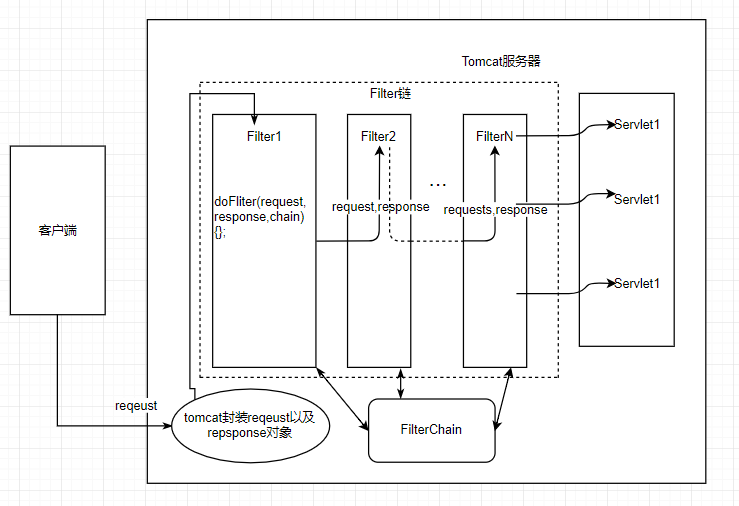
图解
JavaBean(User)
package com.company.domain;

import javax.servlet.http.HttpSessionActivationListener;
import javax.servlet.http.HttpSessionEvent;
import java.io.Serializable;

/*
作为请求传递的数据的一个封装对象
 */
public class User implements Serializable,HttpSessionActivationListener{
    private String username;
    private String realName;
    private String email;
    private String password;
    private String company;
    private String telephone;
    private String UId;
    private String captcha;

    public String getUId() {
        return UId;
    }

    public void setUId(String UId) {
        this.UId = UId;
    }

    @Override
    public String toString() {
        return "User{" +
                "username='" + username + '\'' +
                ", realName='" + realName + '\'' +
                ", email='" + email + '\'' +
                ", password='" + password + '\'' +
                ", company='" + company + '\'' +
                ", telephone='" + telephone + '\'' +
                ", captcha='" + captcha + '\'' +
                '}';
    }

    public String getUsername() {
        return username;
    }

    public void setUsername(String username) {
        this.username = username;
    }

    public String getRealName() {
        return realName;
    }

    public void setRealName(String realName) {
        this.realName = realName;
    }

    public String getEmail() {
        return email;
    }

    public void setEmail(String email) {
        this.email = email;
    }

    public String getPassword() {
        return password;
    }

    public void setPassword(String password) {
        this.password = password;
    }

    public String getCompany() {
        return company;
    }

    public void setCompany(String company) {
        this.company = company;
    }

    public String getTelephone() {
        return telephone;
    }

    public void setTelephone(String telephone) {
        this.telephone = telephone;
    }

    public String getCaptcha() {
        return captcha;
    }

    public void setCaptcha(String captcha) {
        this.captcha = captcha;
    }

    @Override
    public void sessionWillPassivate(HttpSessionEvent httpSessionEvent) {
        System.out.println("我被钝化了");
    }

    @Override
    public void sessionDidActivate(HttpSessionEvent httpSessionEvent) {
        System.out.println("我被活化了");
    }
}
LoginServlet
package com.company.web.servlet;

import com.company.domain.ShortUser;
import com.company.domain.User;
import org.apache.commons.beanutils.BeanUtils;

import javax.servlet.ServletException;
import javax.servlet.annotation.WebServlet;
import javax.servlet.http.*;
import java.io.IOException;
import java.lang.reflect.InvocationTargetException;
import java.util.Map;

@WebServlet(name = "login", urlPatterns = "/login")
public class LoginServlet extends HttpServlet {
    protected void doPost(HttpServletRequest request, HttpServletResponse response) throws ServletException, IOException {
        doGet(request, response);
    }

    protected void doGet(HttpServletRequest request, HttpServletResponse response) throws ServletException, IOException {

        //        0.解决编码问题,获取session对象
        request.setCharacterEncoding("utf-8");
        HttpSession session = request.getSession();

        //        1.判断用户是否需要进行自动登录
        boolean autoLogin = Boolean.valueOf(request.getParameter("autoLogin"));
        if (autoLogin) {

            //            2.用户需要自动登录,将用户信息序列化钝化到本地
            User user = new User();
            Map<String, String[]> parameterMap = request.getParameterMap();
            try {
                BeanUtils.populate(user, parameterMap);
            } catch (IllegalAccessException | InvocationTargetException e) {
                e.printStackTrace();
            }
            session.setAttribute("user", user);

            //            session持久化
            String id = session.getId();
            Cookie cookie = new Cookie("JSESSIONID", id);
            cookie.setMaxAge(1000 * 60 * 100);
            response.addCookie(cookie);
        } else {

            //            3.用户不需要自动登录,将用户信息封装到不需要session持久化的JavaBean中
            ShortUser shortUser = new ShortUser();
            shortUser.setUsername(request.getParameter("username"));
            session.setAttribute("user", shortUser);
        }

        //        4.转发到首页
        response.sendRedirect(request.getContextPath() + "/html/index.html");
    }
}
index.html(Ajax–js)
<script src="../js/jquery-2.1.0.js"></script>
<script>
    $(function () {

        // ajax请求向服务器请求数据
        $.ajax({
            url: "/showuser",
            type: "post",
            success: function (date) {
                if (date !== null) {

                    // 获取对象属性,并且将名字设置到全文
                    $("#user").html(date.username);
                    $("#exit").html("退出")
                }
            },
            dataType: "json"
        })
    })
</script>